Digital and physical spaces
Last updated:
19 October 2026
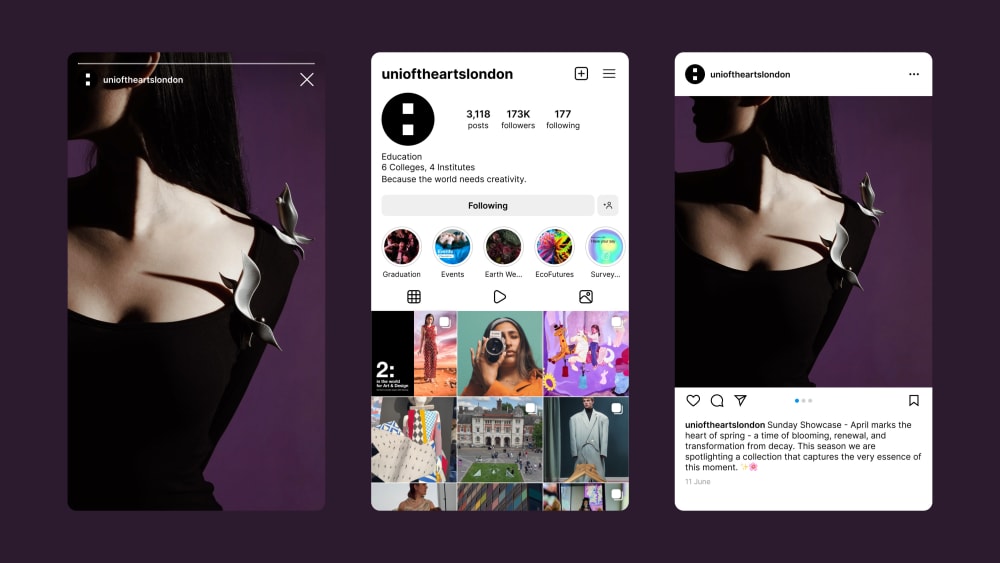
Social media
If you're a UAL student or alumni or a member of an Arts SU sports club or society, follow the relevant guidelines for how to use social media.
Bio
- Include topline information at the start.
- Use line breaks to make it easier to read.
- Avoid overusing hashtags. Only apply hashtags most relevant to your account.
- Where possible, write out your name in full with acronyms in brackets to follow.
- If the account is managed by UAL Communications teams, state the relationship to UAL within the account’s bio and signpost to UAL’s central account. This helps audiences understand which accounts are official and which aren’t.
Example: Camberwell College of Arts, part of @unioftheartslondon.

Crediting and tagging
- Credit and tag any collaborator or owner of work featured in content.
- When crediting student work: [Student/artist’s name] [(@student/artist handle)], [year and course], [@College handle], UAL | Photograph: [photographer's name]
- For videos created by external agencies, credit the primary contributor first, followed by any other key contributors such as an animator.
- When crediting work from external suppliers: [Medium] by [Supplier name] [(@supplier handle)], [Second medium] by [Supplier name] [(@supplier handle)]
- On X, mention the full credits in a thread or tag the handles of the creator/s.

Accessibility
Alt text and image descriptions
- Intended to help people with visual impairments access visual content, but also benefits all users.
- This is different to a caption. Where alt text is not available, use the caption to include this information.
- Infographics and other images containing a large amount of information should have alt text and be explained in the caption.
Filters and effects
Use filters and effects sparingly, unless they have been developed in-house for specific content. Always consider accessibility within use.
Fonts and colours
For more reactive content not using our branded templates where you may need to use in-app editing features for text overlay, follow these guidelines:
- Fonts: use sans serif fonts that align best with our primary typeface, Helvetica Neue.
- Font size: consider the size of the font if applying it manually to make sure it's accessible.
- Alignment: make sure the text is left-aligned.
- Font colour and highlight: use black or white fonts with opposing highlight colour.
Music and audio
Use captions and audio description to communicate the audible element.
Music
- Select music which is royalty free and you have a licence to use.
- If you are posting organically through channels with existing music libraries, make sure your account is set to a Business or Professional account to ensure you're only using music permitted for commercial use.
- If you commission a music producer or sound designer to score a track for your production, remember to share our brand guidelines with them.
Original audio
Although ‘Original Audio’ is popular on some channels such as TikTok, we don't recommend using it as we don't know the source or context.
Emails and signatures
Writing an email
Use the below styling:
- Typeface: Arial / Arial bold, 12pt.
- Colour: Black.
- Alignment: Left aligned.
University level signature
Copy the relevant email signature from below, paste it into Outlook and update with your personal details:
Minimum detail
Name (/neɪm/) Surname (/ˈsəːneɪm/) they/them/theirs
Job title
Department
University of the Arts London
arts.ac.uk
Maximum detail
Name (/neɪm/) Surname (/ˈsəːneɪm/) they/them/theirs
Job title
Department
+44 (0)700 000 000
Working pattern: Monday, Tuesday, Friday 10am – 4pm
University of the Arts London
272 High Holborn, London WC1V 7EY
Instagram | LinkedIn | YouTube | Facebook | Twitter
College level signature
Copy the relevant email signature from below, paste it into Outlook and update with your personal details. If you need to refer to more than 1 College, spell them out in full.
Example: Camberwell, Chelsea and Wimbledon Colleges of Arts.
Minimum detail
Name (/neɪm/) Surname (/ˈsəːneɪm/) they/them/theirs
Job title
Department
Camberwell College of Arts
University of the Arts London
arts.ac.uk/colleges/camberwell-college-of-arts
Maximum detail
Name (/neɪm/) Surname (/ˈsəːneɪm/) they/them/theirs
Job title
Department
+44 (0) 700 000 000
Working pattern: Monday, Tuesday, Friday 10am – 4pm
Camberwell College of Arts
University of the Arts London
45-65 Peckham Rd, London SE5 8UF
Pronouns
By including pronouns in our email signatures, we avoid creating situations where people make assumptions about gender identity. This is just one of the many ways to create inclusive spaces for everyone. Read more guidance on pronouns.
Additional wording and imagery
- Don't add additional wording. This adds more data to the email and increases the carbon footprint.
- Don't use imagery in your signature. It adds more data, interrupts the format and may prevent a recipient from seeing your signature or risk filtering your email to spam.
Estates
Download the latest approved assets provided by the Estates team from the UAL Brand Asset Library to maintain a consistent and accessible campus experience. If you're creating or updating these materials, contact the Estates team at EstatesHelpDesk@arts.ac.uk before making any changes.
